
Your images.
Ready to publish.
Compress, crop and resize. Turn one image into JPG or WebP versions for every place you publish.
Version 1.0.0 · Windows 64-bit / 5.9 MB ZIP
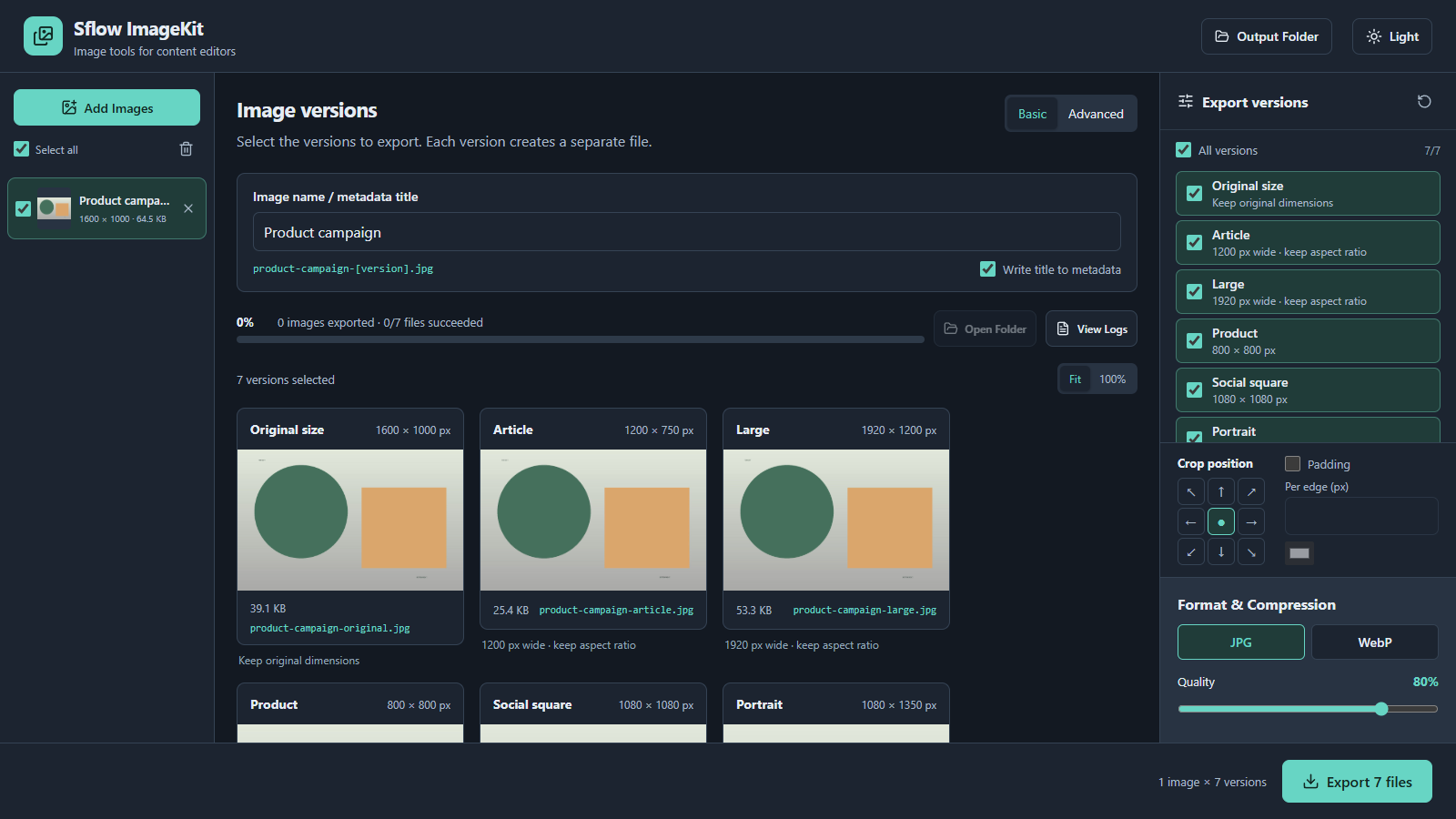
Less image prep.
More publishing.
For anyone preparing images every day. Your files stay on your computer.
- Content editors
- Prepare article covers and social images together.
- Online sellers
- Make consistent product images with crop and padding.
- Marketing teams
- Batch export, use slug filenames and add title metadata.
JPG & WebP export / Batch compression / Resize & crop / PNG background & padding
How to use
Add your images
Extract the ZIP, open SflowImageKit.exe and click Add Images, or drag files in.
Pick the result
Use Basic for preset sizes, or Advanced for resize and crop. Preview before exporting.
Export and publish
Choose JPG or WebP, set quality, select Output Folder and export. Check failures in View Logs.
Ready on Windows.
A portable app. Extract the folder and open it.
- Windows 64-bit
- Microsoft Edge WebView2 Runtime required.
- Local processing
- No Go or Node.js installation needed.
- Still images
- JPG, PNG and WebP. Up to 200 images per batch.
Up to 80 MB and 40 megapixels per image. This release is unsigned.
Read the user guide